

Verification reports, study history and evidence binders.
Every report uses a saved calculation with its readings, limits and exclusions. Open those records when a colleague or inspector asks about an earlier result.
Study reports
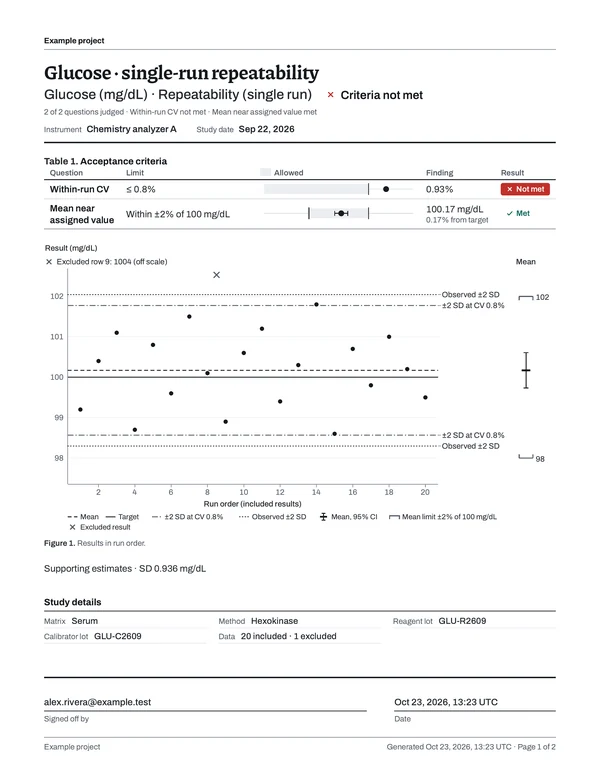
Page 1 gives the outcome, figures, each result against its acceptance limit and the study details. The readings start on page 2, including every exclusion with its reason. Calculation methods, sources and study history follow.
If you change the data or an acceptance limit later, LabRuns saves a new revision. Recalculate to save the new results alongside the original calculation.
Study history
History shows every study revision, including imports, original and corrected values, and exclusions with their reasons. Each calculation includes the data, settings and limits it used. Earlier calculations and reports open as saved.
Report sign-off
After you calculate, read through the PDF. Sign-off is optional, and when someone signs, the report records their account and the date. Once a report is signed, nobody can change it or its PDF, and any later correction becomes a new version.
Evidence binders
Prepare an inspection binder with the report versions you choose, grouped by analyte or analyzer. LabRuns adds a contents page and an evidence index, and each study keeps its own outcome.
Download the binder as one combined PDF, or as an archive with the individual reports, saved calculations, results tables, imports and file checksums. To add work you finish later, create another binder.
Workspace export
Owners and administrators can download every record in the workspace as one ZIP. It holds the data, saved calculations, reports as HTML and stored PDFs, history, imports and supporting records. File checksums and record counts let you confirm the copy is complete.
Any single report downloads as a PDF from its study.
Institutional review
When your laboratory reviews LabRuns, start with the calculation checks, the methods and sources and the software evaluation package.
- Calculation checks
- The recalculations made with separately written code, the tolerance for each comparison and the verification receipt.
- Methods and sources
- Each method's supported design, its scope and its sources.
- Software evaluation package
- Study inputs, expected results and reports to run in your own workspace and compare.
- Institutional review information
- Data handling, access, backups, recovery and support.
- Data & security
- What data you can enter and how saved records are protected.
Read a report, then run your own.
Change the readings in the glucose example and open its report, or start your free week with your own analyzer results.