

CAP COM.04250: instrument comparability
Run the same patient specimens on each instrument, check every difference against your limit, and keep a dated record of each comparison through the year.
Checklist requirements
COM.04250 applies when your laboratory reports the same analyte on more than one nonwaived instrument or method, backup analyzers included, and calls for at least two comparisons each calendar year. If a comparison fails, COM.04300 covers the investigation and corrective action.
Based on the CAP checklists dated 9 December 2025.
Before you start
- Patient specimens covering the concentration groups you intend to use.
- Every analyzer, with routine QC and calibration checked.
- The documented specimen stability window, and consistent handling.
Make sure the specimens include your medical decision levels. If you add a shared control material, choose one that behaves the same way on every system.
Samples and acceptance limits
Suggested starting design: 20 independent specimens, each measured once on every analyzer; 60 results in 60 rows with 3 analyzers.
Choose the count from the precision you need for the mean difference. For example, with a paired-difference SD of about 2 units, 20 specimens give a 95% interval of about ±0.94 units around the mean difference. Plan more for wider scatter or separate concentration groups. Calculated with the NIST mean-interval formula.
Calculation minimum: Comparative-analyzer results on at least 2 specimens. For each analyzer, the specimen rule needs at least 5 specimens, with at least 95% within their allowable difference.
With fewer than 20 specimens, the 95% rule means every specimen has to be within its allowance.
Running it in LabRuns
- Choose New study → Instrument comparison and enter the analyte, the unit and the reference analyzer, spelled exactly as it appears in your data.
- On Set up → Acceptance limits, enter the allowable difference for each specimen, with different limits by concentration if your procedure uses them.
- On Data, type, paste or import the readings. Give each specimen the same ID on every instrument, name each instrument the same way every time, and keep repeat readings under the same specimen ID.
- Save and calculate, then open Results and check each instrument against the reference before you go to Report.
Download the example CSV to see the columns, then replace the example results and IDs with your own.
Checking the results
For each analyzer, look at the matched count, any missing results, every specimen's difference against its limit and the mean difference in each concentration group. A good mean difference can hide a few specimens well outside their allowance, so check them one by one. Repeat readings are averaged for each specimen on each instrument and count once.
If you entered a claimed reportable range, the coverage result shows the span your paired specimens covered. To verify the directly measured range itself, run an AMR verification.
For a Not met or Undecided result, follow the study's troubleshooting steps.
Records to keep
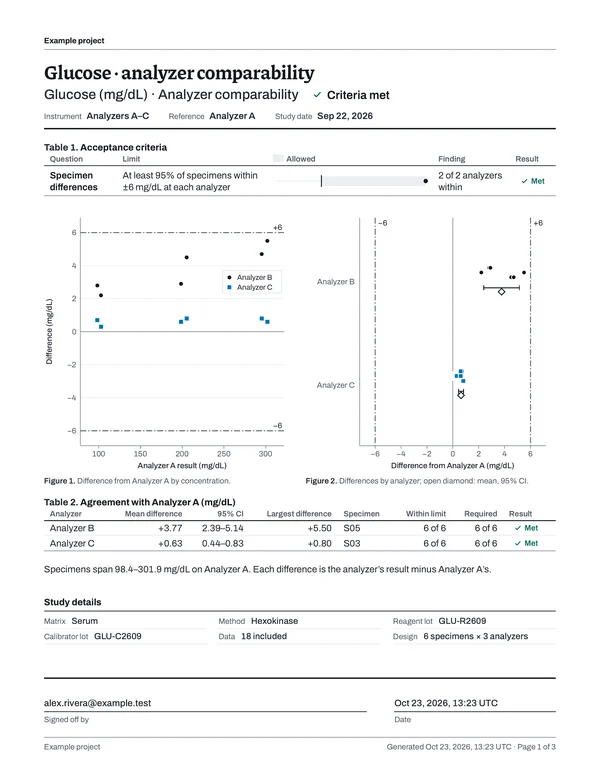
Once the study is calculated, download the PDF from Report. The table shows which parts of the report answer each checklist item and what your laboratory keeps alongside it; each number is ringed on page 1 of the example report beside it.
| Checklist item | In the LabRuns report | From your lab |
|---|---|---|
| COM.04250 |
| Comparability schedule and laboratory acceptance criteria |
| COM.04300 |
| Investigation and corrective action for unacceptable comparability |
Keep your written comparability procedure, the instrument list, the acceptance limits and the date of each comparison. If a comparison failed, keep what you found and what you did about it.
To put several studies together for an inspection, open Reports → Binders, choose Create binder, pick the studies and report versions, group them by analyte or analyzer and choose Build binder. You get one PDF with a CAP evidence index, plus an archive of the reports, saved calculations, result CSVs and the imports you kept, with a checksum for every file. How to build a binder.
Schedule the next study
Choose the calendar-year instrument comparability rule and enter two planned dates for the year. Revisit the schedule whenever you add or change an instrument or method.
In Recurring work, choose Add schedule, pick the saved study and the rule that applies, and set the next due date. When the work comes due, Create next study copies the setup and limits. Afterwards, Record performed work links the calculated study to the event with the date you ran the measurements. How scheduling works.
Sources
CAP: COM.04250 comparability guidance (2022) covers which instruments and specimen types are in scope and why patient specimens are preferred.
Instrument comparison bench guide · Settings, acceptance rules and calculations.