

CAP COM.30450: reagent lot verification
Run the same patient specimens on the old lot and the new one, check each difference against your limit, and keep the results with the lot numbers and shipment details.
Checklist requirements
COM.30450 covers checking new reagent lots and shipments before or as they go into service for nonwaived testing, and that includes a new shipment of a lot you already have. This guide uses patient specimens: you run the same specimens on the old lot and the new one.
Based on the CAP checklists dated 9 December 2025.
Before you start
- Independent patient specimens in every important concentration group.
- Both lots, with appropriate calibration and QC. Measure within the specimens' stability window.
- Optional QC results, alongside the patient specimens.
Plan the comparison while you still have the old lot and enough stable specimens. Write down the received date or shipment number as well as the lot number, so you can tell two deliveries of the same lot apart.
Samples and acceptance limits
Suggested starting design: 3 concentration groups × 20 specimens, each measured once on both lots; 60 specimens, 120 results.
Choose enough independent specimens to cover each important concentration group and the method's variability. For example, with a paired-difference SD of 2 units, 20 specimens per group give a 95% interval of about ±0.94 units around the mean difference. Calculated with the NIST mean-interval formula.
Calculation minimum: Calculation needs at least 2 paired specimens. To pass, at least 95% must be within their allowable error. With fewer than 20 specimens, all must pass. Select Every specimen must be within its limit to require all specimens at any count. The lot plan must also be complete.
Running it in LabRuns
- Choose New study → Reagent lot comparison and enter the analyte, the unit, the old lot and the new lot.
- On Set up, check the concentration groups and number of pairs under Lot plan, then enter the allowable error for each specimen under Acceptance limits.
- On Data, enter or import each specimen on both lots and keep it in the same concentration group. IDs that start with QC are treated as control material, so give patient specimens ordinary coded IDs.
- Save and calculate. On Results, check that the plan is complete, the specimens matched up and how each one did.
Download the example CSV to see the columns, then replace the example results and IDs with your own.
Checking the results
Look at each concentration group as well as the overall shift, since a new lot can look fine on average and still move one end of the range. Check for unmatched specimens, every difference against its limit and the claimed-range coverage. Differences are new lot minus old lot, so a positive difference means the new lot reads higher. QC results can sit in the same study, and their outcomes are read separately from the patient specimens.
For a Not met or Undecided result, follow the study's troubleshooting steps.
Records to keep
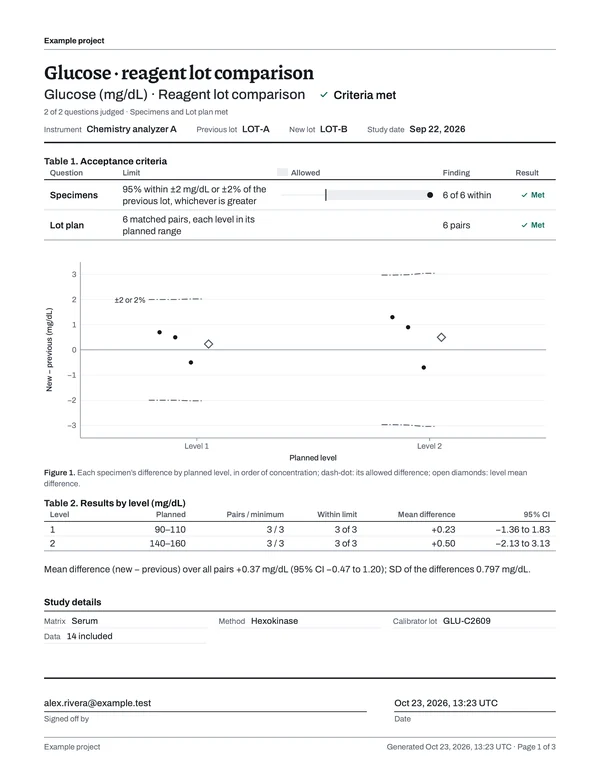
Once the study is calculated, download the PDF from Report. The table shows which parts of the report answer each checklist item and what your laboratory keeps alongside it; each number is ringed on page 1 of the example report beside it.
| Checklist item | In the LabRuns report | From your lab |
|---|---|---|
| COM.30450 |
| Material suitability and lot or shipment acceptance records |
Keep why you chose the materials, the old and new lot numbers, the shipment details, the dates you compared them and whether you accepted the lot. If something didn't match and you did more work, keep that investigation with the first comparison and the one that followed.
To put several studies together for an inspection, open Reports → Binders, choose Create binder, pick the studies and report versions, group them by analyte or analyzer and choose Build binder. You get one PDF with a CAP evidence index, plus an archive of the reports, saved calculations, result CSVs and the imports you kept, with a checksum for every file. How to build a binder.
Schedule the next study
Use the reagent lot/shipment rule for each new lot or another shipment of the same lot. Later deliveries can reuse the saved lot plan; check the materials, lot numbers and limits on each new study.
In Recurring work, choose Add schedule, pick the saved study and the rule that applies, and set the next due date. When the work comes due, Create next study copies the setup and limits. Afterwards, Record performed work links the calculated study to the event with the date you ran the measurements. How scheduling works.
Sources
CAP TODAY: reagent lot materials and instrument coverage (May 2022) explains how to choose materials for COM.30450 and how to handle testing across more than one instrument.
Reagent lot comparison bench guide · Settings, acceptance rules and calculations.