

CAP CHM.13550 and CHM.13600: linearity and AMR verification
Check that the response is a straight line, that results are accurate, and that your materials cover the analytical measurement range (AMR), with a separate outcome for each.
Checklist requirements
CHM.13550 covers the materials for chemistry AMR verification, and CHM.13600 covers the verification itself and how often to do it. The AMR is the range the assay measures directly through its usual process, with no extra dilution or concentration.
A linearity study tells you whether the response is a straight line across the concentrations. Verifying the AMR also takes suitable low, middle and high materials, acceptable accuracy and good coverage of both endpoints.
Based on the CAP checklists dated 9 December 2025.
Before you start
- A series of known concentrations from suitable commercial materials or a documented admixture series.
- Levels at the intended low and high ends, with the others spread between them.
- A record of how each expected concentration was assigned.
Keep the material lot, matrix, preparation and assigned concentrations. If you extend the reported range with extra dilution, plan a dilution verification as well and keep your dilution and reporting procedure.
Samples and acceptance limits
Suggested starting design: 5 concentrations × 3 measurements each; 15 results.
Add levels around clinical decision concentrations or suspected curvature. This plan follows the example in Xiao and Chambliss's 2023 review of reportable range verification.
Calculation minimum: Fitting a line needs 3 different expected concentrations. Deciding criteria needs 2 replicates per level.
Keep the deviation-from-line limit separate from agreement with the assigned values, because a method can be perfectly linear and still read high all the way up. For the AMR you also need an accuracy check, either here with independently assigned concentrations or in a linked calibration verification study. If you leave the endpoint proximity allowance blank, LabRuns uses 10%.
Running it in LabRuns
- Choose New study → Linearity and enter the analyte and unit.
- On Set up → Acceptance limits, add Deviation from the fitted line. With independently assigned concentrations, add your bias or recovery limits, and a total-error allowance if you want every replicate checked.
- Under Reportable range (optional), enter the direct AMR endpoints and the endpoint proximity allowance.
- On Data, enter or import each replicate with its expected concentration and the same level label each time. Save and calculate, then read Linearity, Accuracy and Reportable range.
With an equal-step kit that has no independently assigned values, tick Calculate theoretical values before you enter data and follow the measured-anchor instructions. The calculated values show the shape of the response, and the accuracy checks need independently assigned values.
Download the example CSV to see the columns, then replace the example results and IDs with your own.
Checking the results
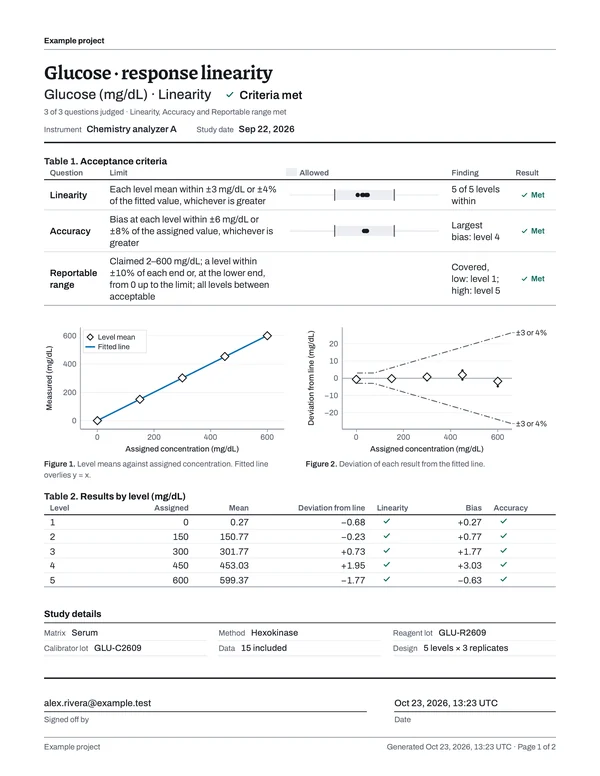
Check that the collection is complete, then look at each level's deviation, the replicate accuracy and the claimed-range coverage. The deviation plot is the quickest place to spot curvature. Percentage recovery divides by the expected concentration, so use an absolute allowance at an expected value of zero.
For a Not met or Undecided result, follow the study's troubleshooting steps.
Records to keep
Once the study is calculated, download the PDF from Report. The table shows which parts of the report answer each checklist item and what your laboratory keeps alongside it; each number is ringed on page 1 of the example report beside it.
| Checklist item | In the LabRuns report | From your lab |
|---|---|---|
| CHM.13550 |
| Material suitability and preparation instructions |
| CHM.13600 |
| AMR schedule and applicable event records |
For each analyte and instrument, keep the material and preparation records, any independent assignments, the direct range you adopted, your endpoint criteria and the date you ran the study, along with any investigation or repeat preparation.
To put several studies together for an inspection, open Reports → Binders, choose Create binder, pick the studies and report versions, group them by analyte or analyzer and choose Build binder. You get one PDF with a CAP evidence index, plus an archive of the reports, saved calculations, result CSVs and the imports you kept, with a checksum for every file. How to build a binder.
Schedule the next study
Use the AMR rule to schedule each quantitative chemistry analyte and instrument every six months and after relevant events. A calibration can serve as the AMR verification when its low, middle and high calibrators span the full range and meet the assay's verification instructions.
In Recurring work, choose Add schedule, pick the saved study and the rule that applies, and set the next due date. When the work comes due, Create next study copies the setup and limits. Afterwards, Record performed work links the calculated study to the event with the date you ran the measurements. How scheduling works.
Sources
CAP: CHM.13600 Q&A (updated November 2023) covers materials, how often to verify, which instruments to include and endpoint acceptance. Xiao and Chambliss (2023): reportable range verification is the published background for the suggested linearity design, and CAP: calibration verification and linearity explains how the two evaluations fit together.
Linearity bench guide · Settings, acceptance rules and calculations.