


Reference interval verification reference
Reference interval verification tests healthy subjects from your own population against a claimed reference interval from a package insert, the literature or an earlier study. It checks a two-sided interval, for example 4.0 to 11.0, or a one-sided lower or upper limit, and reports how many subjects fall below, within and above the claimed limits in each partition.
Settings
Section titled “Settings”| Setting | Where | Meaning |
|---|---|---|
| Reference limits | New study and Set up | Two-sided interval (lower and upper limits), one-sided lower reference limit or one-sided upper reference limit |
| Claimed lower reference limit, Claimed upper reference limit | New study and Set up | Both for a two-sided check, with the lower below the upper; only its own for a one-sided check. Both may stay blank while you plan. A one-sided check shows and keeps only its own limit |
Design
Section titled “Design”- Healthy reference subjects who meet your eligibility rules, each with a coded ID.
- One result per subject. Repeat draws are averaged, and the subject counts once.
- Optionally a partition for each subject, for example
adultandsenior. Partitions are counted separately. Without partitions, all subjects are in partition1. - The counts to collect are in the collection plan under Run this study.
Staged rule
Section titled “Staged rule”Each stage has Subjects tested (the running total in entry order), Accept when ≤ this many outside, Reject when ≥ this many outside and, from the second stage, Subjects counted: All subjects so far or This stage’s new subjects only. A new study starts with one stage: 20 subjects, accepting when at most 2 are outside (the 2-of-20 criterion of CLSI EP28-A3c (2010) §11.2) and rejecting when 3 or more are. Add stage adds a further check, up to 10 stages, and Remove stage drops one. A stage you add counts All subjects so far; choose This stage’s new subjects only to judge its new subjects on their own. With the stages blank, the study reports counts only.
- Every number is a whole number, with at least 2 subjects per stage.
- Subjects tested rise from stage to stage.
- The accept number is below the reject number, and the reject number can't exceed the subjects the stage counts.
- Reject may be blank on every stage but the last: a count above the accept number then moves to the next stage.
How the stages are applied is in Staged verification rules.
Columns
Section titled “Columns”| Column use | Grid column | Required | What to enter |
|---|---|---|---|
| Specimen or material ID | Subject ID | Yes | Coded ID of the reference subject, one per person (no names). Repeat draws share the subject's ID |
| Result | Result | Yes | The measured value. The analysis needs exact values |
| Level or group | Partition | No | The reference group, for example adult |
| Replicate | Replicate | No | Draw number, for your records |
Day and Run can be imported but aren't shown in the grid. See Importing and mapping and Column reference.
The calculation stops until these are fixed:
- missing claimed limits;
- a missing analyte or unit;
- a subject entered in two partitions;
- a cohort with no eligible subjects;
- marked rows, for example an exclusion without a reason.
Acceptance limits
Section titled “Acceptance limits”The dialog and its choices are in Set acceptance limits. For this study:
- Share of results inside the interval is the percentage of eligible subjects within the claimed limits, for example "at least 90".
- Each partition is compared separately, and each must meet the limit.
- A staged rule is added to the limits as Recorded verification rule. A rejection makes the study Criteria not met. An unresolved rule leaves it Undecided, even when overall coverage is Met.
See About acceptance decisions.
Results and plots
Section titled “Results and plots”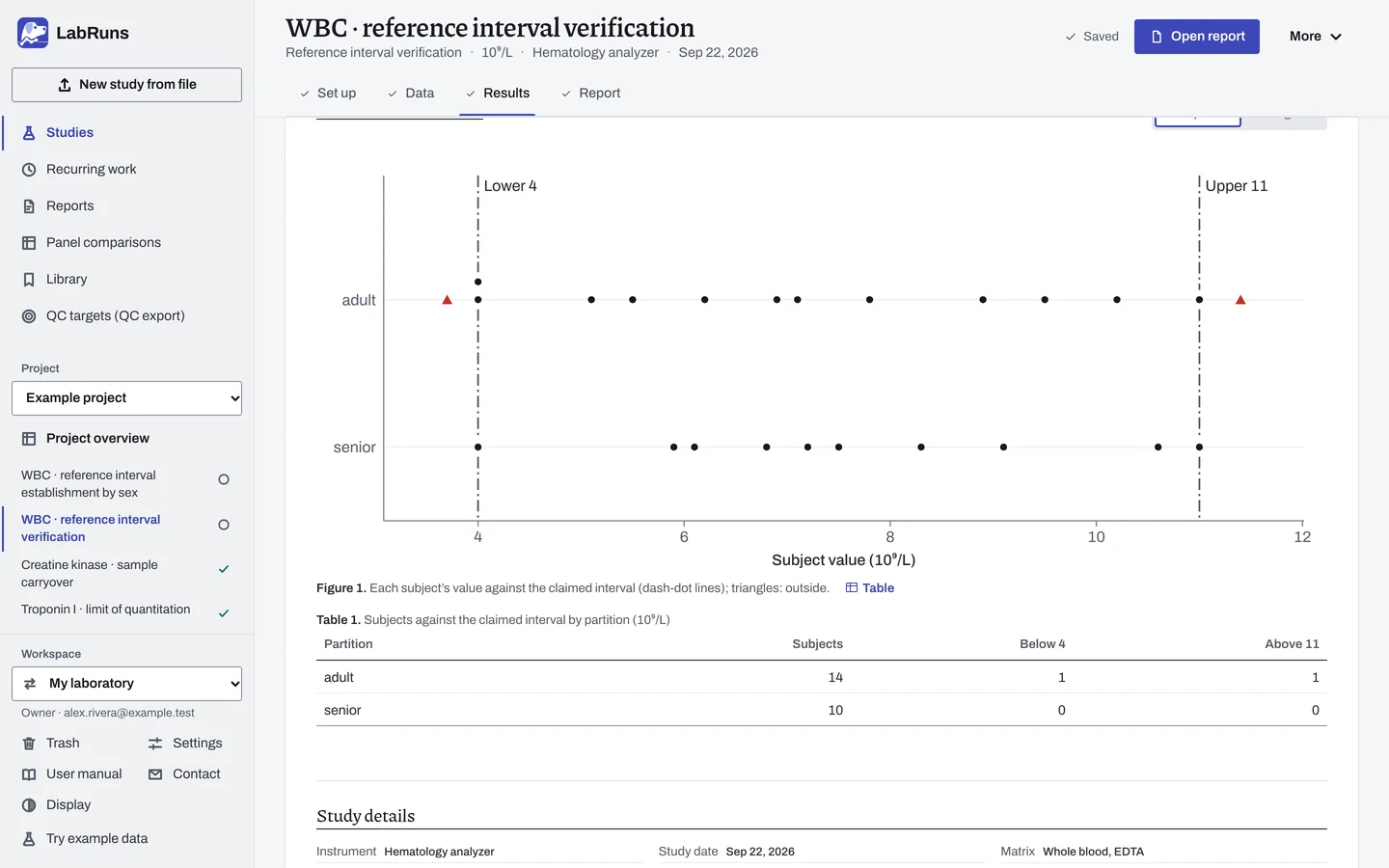
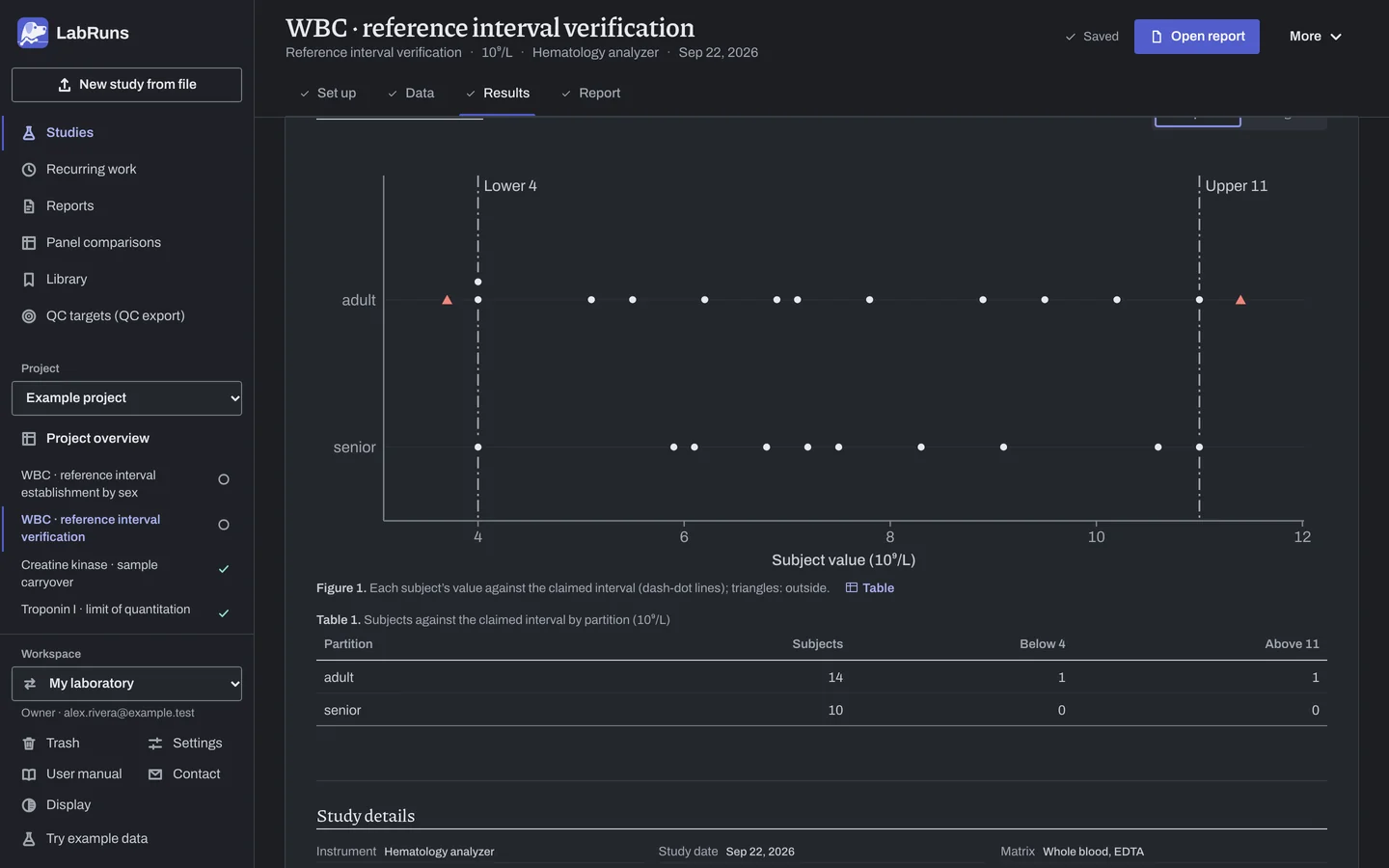
The summary and overview show every partition. With several, Partition details chooses the partition whose supporting details are shown.
- Subjects against the claimed interval by partition gives each partition's subjects and the counts below and above the claimed limits, with the share within and its result when a limit is set.
- Subject values by partition gives the values exactly on a limit, repeat subjects, mean, SD and observed range.
- A one-sided check shows only its side.
- The acceptance table shows the share of subjects inside the claimed limits, which is what the limit is checked against. It has no confidence interval.
- With a staged rule, Verification rule gives each stage of each partition: Subjects (the subjects it counts, marked new when it counts only its own), Outside, the IDs of the subjects outside (Newly outside with several stages, so each subject is named once, at the first stage that counted it), Accept if ≤, Reject if ≥ and the Outcome: Within the accept bound, At or beyond the reject bound, Continue to stage 2, Between the bounds, Needs 6 more subjects, Not needed or Not reached. The conclusion reads Within the accept bound, At or beyond the reject bound or Inconclusive under the rule, with the reason. Design names the rule by its stages, for example Single-stage rule or Two-stage rule.
- The plot shows each subject's value against the claimed limits (dashed lines), with values outside as triangles. It switches between Raw points and Histogram.
- Review values outside 1.5·IQR whiskers lists values beyond the fences with View row links. Flagged values stay in the result.
- Including excluded rows (for information only) appears when a partition has excluded rows. It shows the counts with them added back.
- Distribution diagnostics describe shape only; see Distribution diagnostics.
Example
Section titled “Example”reference_verify.csv holds 25 example white blood cell counts (10^9/L) from 24 subjects: 14 adult (subject S003 has two draws, 5.4 and 5.6) and 10 senior. Several values sit exactly on 4.0 or 11.0.
Setup: two-sided, claimed 4 to 11 10^9/L; no staged rule; one limit, Share of results inside the interval at least 90 %.
| Partition | Eligible subjects | Below the lower limit | Within both limits | Above the upper limit | Exactly on a limit |
|---|---|---|---|---|---|
| adult | 14 | 1 | 12 | 1 | 3 |
| senior | 10 | 0 | 10 | 0 | 2 |
- Adult: 15 rows became 14 subjects because
S003's two draws averaged to 5.5. - Values exactly on 4 or 11 count as within.
- The review list flagged no values.
| Partition | Share inside | Limit: ≥ 90% |
|---|---|---|
| adult | 85.71% (12 of 14) | Not met |
| senior | 100.00% (10 of 10) | Met |
The study status is Criteria not met.
With a staged rule
Section titled “With a staged rule”Same file, with an example rule: stage 1 = 10 subjects, accept ≤ 0, reject ≥ 3; stage 2 = 20 subjects, accept ≤ 2, reject ≥ 3.
| Partition | Conclusion | Detail |
|---|---|---|
| senior | Within the accept bound | Stage 1: 0 of 10 subjects are outside [4, 11] |
| adult | Inconclusive under the rule | Stage 2 needs 20 eligible subjects and adult has 14. Add 6 more to continue |
The rule's own check in the acceptance table is Met for senior and Undecided for adult.
Calculations and sources
Section titled “Calculations and sources”When you calculate WBC · reference interval verification in the example project, LabRuns records these methods:
- Eligible subjects are counted below, within and above the claimed limits. A value equal to a limit counts as within and is also counted as a boundary hit.
- The descriptive design reports counts only. A named staged design compares the outside counts, in entry order, with the thresholds set for each stage. Without thresholds it is inconclusive.
- Repeat draws from one subject are averaged into one value. Each partition is analyzed on its own. The distribution histogram uses ceil(√n) equal-width bins, at most 40.
- A staged rule gives one acceptance criterion per partition. Each partition must pass on its own.
- Distribution diagnostics: ordered values plotted against standard-normal quantiles at Blom positions pᵢ = (i − 3/8)/(n + 1/4).
- Box: type-7 quartiles, IQR = Q3 − Q1. Whiskers end at the most extreme values within Q1 − 1.5 IQR and Q3 + 1.5 IQR. Values beyond the whiskers stay in the analysis.
- Q–Q and box plots need at least 3 values that are not all identical. The strip plot shows every included value.
- Reference review: Tukey 1.5·IQR screening using the type-7 quartiles. Values outside Q1 − 1.5·IQR or Q3 + 1.5·IQR are flagged for review. Values equal to a fence are not flagged.
- Within-interval share =
100 × within / eligible subjects.
Staged verification rules
Section titled “Staged verification rules”Within each partition, subjects are taken in entry order. Each stage counts subjects outside the claimed limits and compares that count with its accept and reject numbers. It counts the first n subjects, or only the subjects after the previous stage's total when set to count new subjects only. At or below the accept number accepts. At or above the reject number rejects. Anything between, or anything above the accept number on a stage without a reject number, moves to the next stage. With too few subjects for the next stage, the rule is inconclusive and says how many more are needed.
With the filled-in rule, at most 2 of 20 outside is accepted and 3 or more is rejected. With two stages, 20 subjects (accept ≤ 2, reject ≥ 4) and then 40 counting all subjects so far (accept ≤ 4, reject ≥ 5), 3 of the first 20 outside continues to stage 2, and 1 more outside among the next 20 makes 4 of 40, accepted at stage 2; Verification rule names the first 3 at stage 1 and the fourth at stage 2. With fewer than 40 subjects, stage 2 is inconclusive until the rest are entered.
Study-design reference: CLSI EP28-A3c (2010), Defining, Establishing, and Verifying Reference Intervals in the Clinical Laboratory, §11.2, verification of transferred reference intervals. See Study reference.
Evidence references: CAP COM.40605, COM.40615 (9 December 2025). In a binder, the CAP evidence index lists the report sections behind each requirement and the laboratory records that go with them.