


Stability reference
Stability compares results after storage with baseline, usually time 0, condition by condition, and reports for each condition the longest tested time that stays within the allowable change. A paired design remeasures the same materials; an independent design uses different specimens from the same population at each time.
Settings
Section titled “Settings”| Setting | Where | What it does |
|---|---|---|
| What is stored, shown as Stability type on Set up | New study, Stability settings | On New study, Patient specimens, Reagent, Calibrator or Control material; on Set up, Specimen (sample) stability, Reagent stability, Calibrator stability or Control material stability |
| Time unit | New study, Stability settings | The unit of every elapsed time. h unless another, such as days, is entered |
| Largest acceptable change from baseline (%) | New study | Optional. Fills in a percentage allowable change |
| Baseline time | Stability settings | 0 unless another time is entered |
| Allowable change set as | Stability settings | In the study unit, Percentage change from baseline, Either (the larger allowance) or Both must be met; see Allowable change |
| Allowable change | Stability settings | The amount in the study unit, the percentage, or both for Either and Both. Without it, the changes are calculated but get no decision |
| Claimed duration | Storage and handling conditions | Optional, beside a condition. The claim is decided and is part of the study result; see Claimed duration |
| Measurement scale | Calculation settings | Percent limits need Ratio scale · CV usable, the default |
Storage and handling conditions lists every condition in the results, one row each. Names that differ only in case are one condition.
A claimed duration for a condition with no rows is retained and named in the calculation warnings as unevaluated; it does not change the study result.
Design
Section titled “Design”The design is read from the data. When any specimen ID has results at baseline and a later time, or at two later times under one condition, the study is paired: each material's change from its own baseline, then the mean across materials. Otherwise it is independent: the mean at each time minus the mean of the baseline specimens. The heading of Stability settings names the design once results are entered.
| To get | It needs |
|---|---|
| An interval on the mean change | Paired: at least 2 materials with results at baseline and that time. Independent: at least 2 specimens at baseline and 2 at that time |
| A percent change | A ratio scale and a positive baseline mean |
| A within / exceeds decision | An interval and an Allowable change |
| A supported claim | A Claimed duration at or below the supported duration |
Columns
Section titled “Columns”One row per result.
| Column use | Grid column | Required | What to enter |
|---|---|---|---|
| Specimen or material ID | Material / specimen ID | Yes | For example S01. Paired: the same ID at baseline and every time. Independent: a different ID for each specimen, reused only for its replicates |
| Storage condition | Storage condition | For non-baseline rows | The condition name, for example Refrigerated, separated. The same name for every result under one condition; each name in the data is its own condition. Blank on baseline rows shares one baseline across all conditions |
| Time point | Elapsed time | Yes | A number in the Time unit, for example 2, 24 or 72, on the same clock as the Baseline time. Baseline rows use the Baseline time, 0 by default |
| Result | Result | Yes | The result in the study unit |
| Replicate | Replicate | No | A different label for each repeat of one material, condition and time, one row each |
Supported and claimed durations are read on the elapsed-time clock: with a baseline time of 1 h, a result entered at 8 h counts as 8 h, which is 7 h after baseline.
The calculation stops when:
- a row is marked, for example for a later time with no condition, a time before baseline, or a replicate label used twice
- every included row is a baseline, with no storage condition in the data
In a paired design, a material without a baseline is left out of the change. A condition without a baseline gets no change or duration.
Acceptance limits
Section titled “Acceptance limits”Allowable change
Section titled “Allowable change”- The change is compared with the amount in the study unit, and the relative change with the percentage.
- For paired materials, the percentage change is the mean of each material's change relative to its own baseline mean. Independent groups use the change relative to the overall baseline mean.
- Either: within if one part is within; exceeds if both exceed. Both: within if both parts are within; exceeds if either exceeds. Without a relative change, Either uses the study-unit amount alone and Both is inconclusive.
Each time gets one decision:
| Decision | When |
|---|---|
| within | The whole interval lies inside ±allowable change. An edge on the limit counts as inside. A single-value interval (every material changed by the same amount) is decided like any other and the result notes why it is a single value. |
| exceeds | The whole interval lies beyond +limit or −limit. |
| inconclusive (shown as Undecided) | The interval crosses the limit, or touches it from outside, or there is no interval (inconclusive (point estimate only): one material or one specimen). |
| not evaluated | No allowable change set. |
| no estimate | In a paired design, no material has results at both baseline and this time. |
Supported duration = last time of the unbroken run of "within" decisions from the first tested time.
Tested duration within the allowable change
Section titled “Tested duration within the allowable change”The limit Tested duration within the allowable change compares each condition's supported duration with the required duration. A supported duration that reaches the required duration is Met. For a shorter supported duration, the decision uses the tested times from the end of support through the first tested time at or after the required duration. It is Not met when one of those times exceeds the allowable change, including when the first tested time already exceeds it. It is Undecided when the time that ends support is inconclusive or has no estimate. A condition with fewer than 2 materials or specimens is Undecided. A required duration longer than the longest tested time can't be met. A limit whose condition matches no condition in the data is not evaluated, and the study can't reach Criteria met.
Claimed duration
Section titled “Claimed duration”Each Claimed duration becomes its condition's Claimed duration limit, at least the claimed time, beside any limit you enter, and is part of the study result. A claim at or below the supported duration is supported and Met. A longer claim is not supported and is decided like a required duration: Not met when a tested time from the end of support through the first tested time at or after the claim exceeds the allowable change, or when the claim is beyond the longest tested time; Undecided when the time that ends support is inconclusive or has no estimate, or when no allowable change is set. A condition with fewer than 2 materials or specimens leaves the claim Undecided.
Results and plots
Section titled “Results and plots”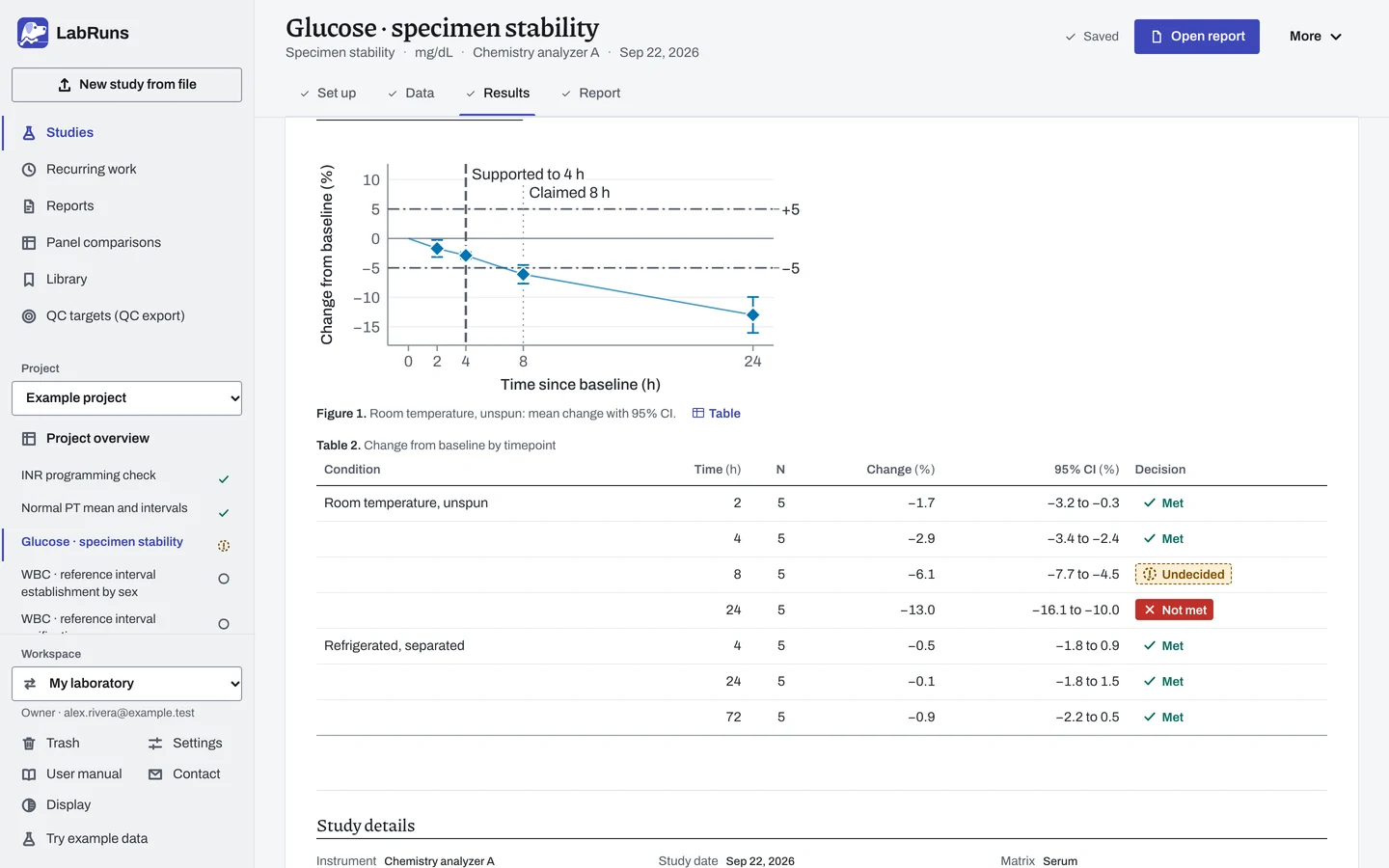
Condition details chooses the condition whose supporting details are shown.
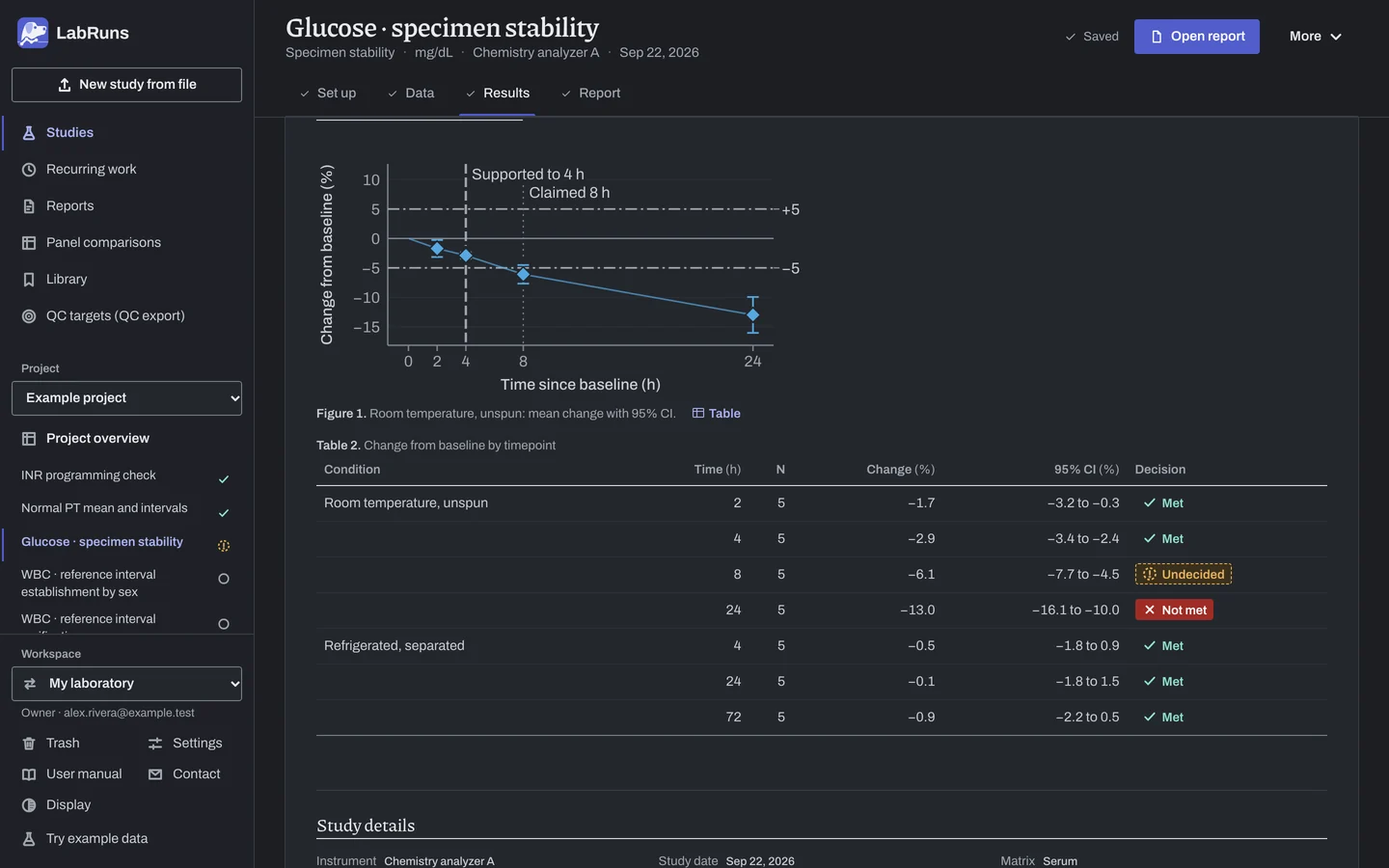
The Change from baseline plot draws time to scale, at the times entered. With a baseline time of 0 the axis reads time since baseline; otherwise it names the baseline time. Diamonds are the mean change with its interval. Dots are each material's change; selecting one finds its row. Lines at ±limit show the allowable change. A vertical line marks the supported duration when it ends before the last tested time, and another marks a claimed duration that differs from it. With a percent limit, the plot shows the percentage change from baseline.
Above the results, each condition has a line with its supported duration and claim. Change from baseline by timepoint gives each time's count, change, interval and decision, in the unit the allowable change uses. Baseline · condition shows the design and which baseline was used (the condition's own, the shared baseline or missing), with its counts and mean.
Example
Section titled “Example”stability.csv: example glucose (mg/dL), five specimens S01 to S05 in duplicate. Baseline at 0 h with a blank condition (shared). Room temperature, unspun at 2, 4, 8 and 24 h. Refrigerated, separated at 4, 24 and 72 h.
Setup: Specimen (sample) stability (read as paired, because each specimen ID repeats), time unit h, baseline 0, Allowable change set as Percentage change from baseline, Allowable change (%) 5, 95 % confidence. Claimed durations: 8 h for "Room temperature, unspun" and 72 h for "Refrigerated, separated". Acceptance limit: Tested duration within the allowable change at least 72 h, for Refrigerated, separated.
Shared baseline: 5 materials, 10 results, mean 165.4 mg/dL.
| Time (h) | Change (%) and 95% CI | Decision |
|---|---|---|
| 2 | −1.7 (−3.2 to −0.3) | Within |
| 4 | −2.9 (−3.4 to −2.4) | Within |
| 8 | −6.1 (−7.7 to −4.5) | Undecided (inconclusive) |
| 24 | −13.0 (−16.1 to −10.0) | Exceeds |
Supported: 4 h, because 8 h is inconclusive. Claimed 8 h: not supported.
| Time (h) | Change (%) and 95% CI | Decision |
|---|---|---|
| 4 | −0.5 (−1.8 to 0.9) | Within |
| 24 | −0.1 (−1.8 to 1.5) | Within |
| 72 | −0.9 (−2.2 to 0.5) | Within |
Supported: 72 h. Claimed 72 h: supported.
Room temperature's 8 h claim is Undecided, because 8 h, where support ends, is inconclusive. Refrigerated meets the required 72 h and its 72 h claim, so it is Met. Study status: Undecided.
Two variations:
- Absolute limit of 6 mg/dL: the change is judged in mg/dL and every room-temperature time became inconclusive (at 2 h, −2.9 mg/dL with interval −6.9 to 1.1 crosses −6), so nothing was supported and the 8 h claim was Undecided. Refrigerated stayed at 72 h, and the study read Undecided.
- S05 baseline excluded: S05 was left out of every change, for example −1.4% at 2 h at room temperature. Supported durations stayed at 4 h and 72 h.
Calculations and sources
Section titled “Calculations and sources”When you calculate Glucose · specimen stability in the example project, LabRuns records these methods:
- Each storage or handling condition is analyzed separately. Its baseline is the baseline rows with that condition, or else the baseline rows with a blank condition.
- Paired (repeated-material) design. Replicates are averaged for each material and time. Each material’s change is its timepoint mean minus its baseline mean. The mean change across m materials uses the sample SD (n − 1), SE = SD/√m and a two-sided 95% Student t interval with m − 1 degrees of freedom (NIST/SEMATECH §1.3.5.2). When every material changed by the same amount the SD is 0 and the interval is that single value. Relative change = 100 × change / baseline mean for each material, with the same interval. It needs a ratio scale and a positive baseline mean.
- A single material gives a change with no interval.
- Independent design uses different specimens at each timepoint. Specimen means at the timepoint are compared with specimen means at baseline by a Welch interval, with SE = √(s_t²/n_t + s_0²/n_0) and Welch–Satterthwaite df (NIST/SEMATECH §1.3.5.3). When the specimen means are identical at baseline and identical at the timepoint, SE = 0 and the interval is the difference itself. Relative change and its interval divide by the baseline mean.
- The design is read from the data: paired when any material ID has results at baseline and a later time, or at more than one later time under one condition; otherwise independent.
- Each timepoint is compared with baseline directly, with no regression line. A timepoint is within when its whole interval lies inside ± the allowable change, exceeds when the interval lies entirely beyond one side, and is inconclusive otherwise, including when there is no interval. The allowable change is in the study unit, a percentage change from baseline, or both. With both, the change interval is compared with the study-unit part and the relative-change interval with the percent part. Within either: within when one part is within, exceeds when both exceed. Within both: within when both are within, exceeds when either exceeds.
- The supported duration is the last timepoint of the unbroken run of within timepoints from baseline. A claimed duration is its condition's criterion of at least that duration. A required or claimed duration at or below the supported duration is met. A longer one rests on the tested times from the first one not within through the first tested time at or after it: it is not met when one of those times exceeds the allowable change or no tested time reaches it, and undecided when the time that ends support is inconclusive or has no estimate. It needs at least 2 materials or specimens.
Relative intervals treat the baseline mean as fixed. Decimal changes are calculated before rounding: a change from 2.4 to 2.52 is exactly 5%. A single-value interval at an inclusive limit counts as inside.
Sources: NIST/SEMATECH e-Handbook §1.3.5.2, §1.3.5.3 (Welch) and §1.3.5.6. Study-design references: NIST mean-interval formula, FDA specimen-handling principle. See Study reference.
Evidence references: CAP COM.40350 (9 December 2025). In a binder, the CAP evidence index lists the report sections behind each requirement and the laboratory records that go with them.